Note
The Cisco HyperFlex integration will to deprecate by May 30, 2026 OpsRamp will not allow new installations but will continue supporting existing integrations.Introduction
Cisco HyperFlex integration uses REST APIs to enable hyperconverged infrastructure (HCI) platform components monitoring.\
Supported Target Versions
- Cisco Hyperflex Data Platform: 4.0(2d)
- Gateway: 9.0 and above
Supported Metrics
Click here to view the supported metrics
| Component | Metric Name | Metric Display Name | Units |
|---|---|---|---|
| Hyperflex Cluster | hyperflex_cluster_State | Hyperflex Cluster State | — |
| hyperflex_cluster_SpaceStatus | Hyperflex Cluster SpaceStatus | — | |
| hyperflex_cluster_RawCapacity | Hyperflex Cluster RawCapacity | terabytes | |
| hyperflex_cluster_TotalCapacity | Hyperflex Cluster TotalCapacity | terabytes | |
| hyperflex_cluster_CapacityUtilization | Hyperflex Cluster CapacityUtilization | percent | |
| hyperflex_cluster_FreeCapacity | Hyperflex Cluster FreeMemory | terabytes | |
| hyperflex_cluster_UsedCapacity | Hyperflex Cluster UsedMemory | terabytes | |
| hyperflex_cluster_TotalSavings | Hyperflex Cluster TotalSavings | percent | |
| hyperflex_cluster_CompressionSavings | Hyperflex Cluster CompressionSavings | percent | |
| hyperflex_cluster_DeduplicationSavings | Hyperflex DuplicationSavings | percent | |
| hyperflex_cluster_ResiliencyState | Hyperflex ResilienceState | — | |
| hyperflex_cluster_PolicyCompliance | Hyperflex Cluster PolicyCompliance | — | |
| hyperflex_cluster_alarm_HXA-CLU-0012 | Hyperflex Alarm HXA CLU 0012 | — | |
| hyperflex_cluster_alarm_HXA-CLU-0016 | Hyperflex Alarm HXA CLU 0016 | — | |
| hyperflex_cluster_event_HXSSHAccessToggleActionSuccess | Hyperflex Event HXSshAccessToggleActionSuccess | — | |
| hyperflex_cluster_event_AlarmTriggered | Hyperflex Event AlarmTriggered | — | |
| hyperflex_cluster_event_NodeUpgradeCompletedEvent | Hyperflex Event NodeUpgradeCompletedEvent | — | |
| hyperflex_cluster_event_ClusterUpgradeStartedEvent | Hyperflex Event ClusterUpgradeStartedEvent | — | |
| hyperflex_cluster_event_NodeUpgradeStartedEvent | Hyperflex Event NodeUpgradeStartedEvent | — | |
| hyperflex_cluster_Stats_Counters_NFSReads_Bytes | Cluster Read ThroughPut | — | |
| hyperflex_cluster_Stats_Counters_NFSReads_Rate | Cluster Read IOPS | — | |
| hyperflex_cluster_Stats_Counters_NFSReads_Count | Cluster Read Latency | — | |
| hyperflex_cluster_Stats_Counters_NFSWrites_Count | Cluster Write Latency | — | |
| hyperflex_cluster_Stats_Counters_NFSWrites_Rate | Cluster Write IOPS | — | |
| hyperflex_cluster_Stats_Counters_NFSWrites_Bytes | Hyperflex Host Status | — | |
| Hyperflex Host | hyperflex_cluster_host_Status | Hyperflex Node State | — |
| hyperflex_cluster_node_Stats_Counters_NFSReads_Bytes | Hyperflex Host Read ThroughPut | — | |
| hyperflex_cluster_node_Stats_Counters_NFSReads_Rate | Hyperflex Host Read IOPS | — | |
| hyperflex_cluster_node_Stats_Counters_NFSReads_Count | Hyperflex Host Read Latency | — | |
| hyperflex_cluster_node_Stats_Counters_NFSWrites_Count | Hyperflex Host Write Latency | — | |
| hyperflex_cluster_node_Stats_Counters_NFSWrites_Rate | Hyperflex Host Write IOPS | — | |
| hyperflex_cluster_node_Stats_Counters_NFSWrites_Bytes | Hyperflex Host Write ThroughPut | — | |
| Node Disk | hyperflex_cluster_node_Disk_Medium | Hyperflex Node Disk Medium | — |
| hyperflex_cluster_node_Disk_Usage | Hyperflex Node Disk Usage | — | |
| hyperflex_cluster_node_Disk_Capacity | Hyperflex Node Disk Capacity | gigabytes | |
| hyperflex_cluster_node_Disk_UsedCapacity | Hyperflex Node Disk UsedCapacity | gigabytes | |
| hyperflex_cluster_node_Disk_FreeCapacity | Hyperflex Node Disk FreeCapacity | gigabytes | |
| hyperflex_cluster_node_Disk_Utilization | Hyperflex Node Disk Utilization | percent | |
| hyperflex_cluster_node_Disk_State | Hyperflex Node Disk State< | — | |
| hyperflex_cluster_node_Disk_Status | Hyperflex Node Disk Status | — | |
| hyperflex_cluster_node_Disk_Type | Hyperflex Node Disk Type | — | |
| ControllerVM | hyperflex_cluster_node_controller_vm_State | Hyperflex Node controllerVM State | — |
| hyperflex_cluster_node_controller_vm_Disk_Count | Hyperflex Node controllerVM Disk Count | count | |
| hyperflex_cluster_node_controller_vm_ConfiguredMemory | Hyperflex Node controllerVM memory | bytes | |
| VirtualMachine | hyperflex_cluster_virtualmachine_State | Hyperflex Virtual Machine State | — |
| hyperflex_cluster_virtualmachine_Storage_UsedCapacity | Hyperflex Virtual Machine UsedCapacity | gigabytes | |
| hyperflex_cluster_virtualmachine_Storage_Capacity | Hyperflex Virtual Machine Storage Capacity | gigabytes | |
| hyperflex_cluster_virtualmachine_Storage_FreeCapacity | Hyperflex Virtual Machine FreeCapacity | gigabytes | |
| hyperflex_cluster_virtualmachine_Storage_Utlization | Hyperflex Virtual Machine Storage Utilization | percent | |
| Datastore | hyperflex_cluster_datastore_TotalCapacity | Hyperflex Datastore TotalCapacity | terabytes |
| hyperflex_cluster_datastore_FreeCapacity | Hyperflex Datastore FreeCapacity | terabytes | |
| hyperflex_cluster_datastore_UsedCapacity | Hyperflex Datastore UsedCapacity | terabytes | |
| hyperflex_cluster_datastore_ProvisionedCapacity | Hyperflex Datastore ProvisionedCapacity | terabytes | |
| hyperflex_cluster_datastore_UnCompressedUsed | Hyperflex Datastore UnCompressedUsed | gigabytes | |
| hyperflex_cluster_datastore_Utlization | Hyperflex Datastore Utilization | percent | |
| hyperflex_cluster_datastore_Mirrors | Hyperflex Datastore Mirrors | count | |
| hyperflex_cluster_datastore_Num_of_StripesforLargeFiles | Hyperflex Datastore NumofStripesForLargeFiles | count | |
| hyperflex_cluster_datastore_DataBlock_Size | Hyperflex Datastore DataBlock Size | kilobytes | |
| hyperflex_cluster_datastore_Status | Hyperflex Datastore Status | — |
Create a credential
- Select a client from the All Clients list.
- Go to Setup > Accounts > Clients.
- On the client Credentials tab, add the credential information.
Configure and install the integration
- From All Clients, select a client.
- Navigate to Setup > Account.
- Select the Integrations and Apps tab.
- The Installed Integrations page, where all the installed applications are displayed. If there are no installed applications, it will navigate to the Available Integrations and Apps page.
- Click + ADD on the Installed Integrations page. The Available Integrations and Apps page displays all the available applications along with the newly created application with the version.
Note: Search for the application using the search option available. Alternatively, use the All Categories option to search. - Click ADD in the Cisco HyperFlex application.
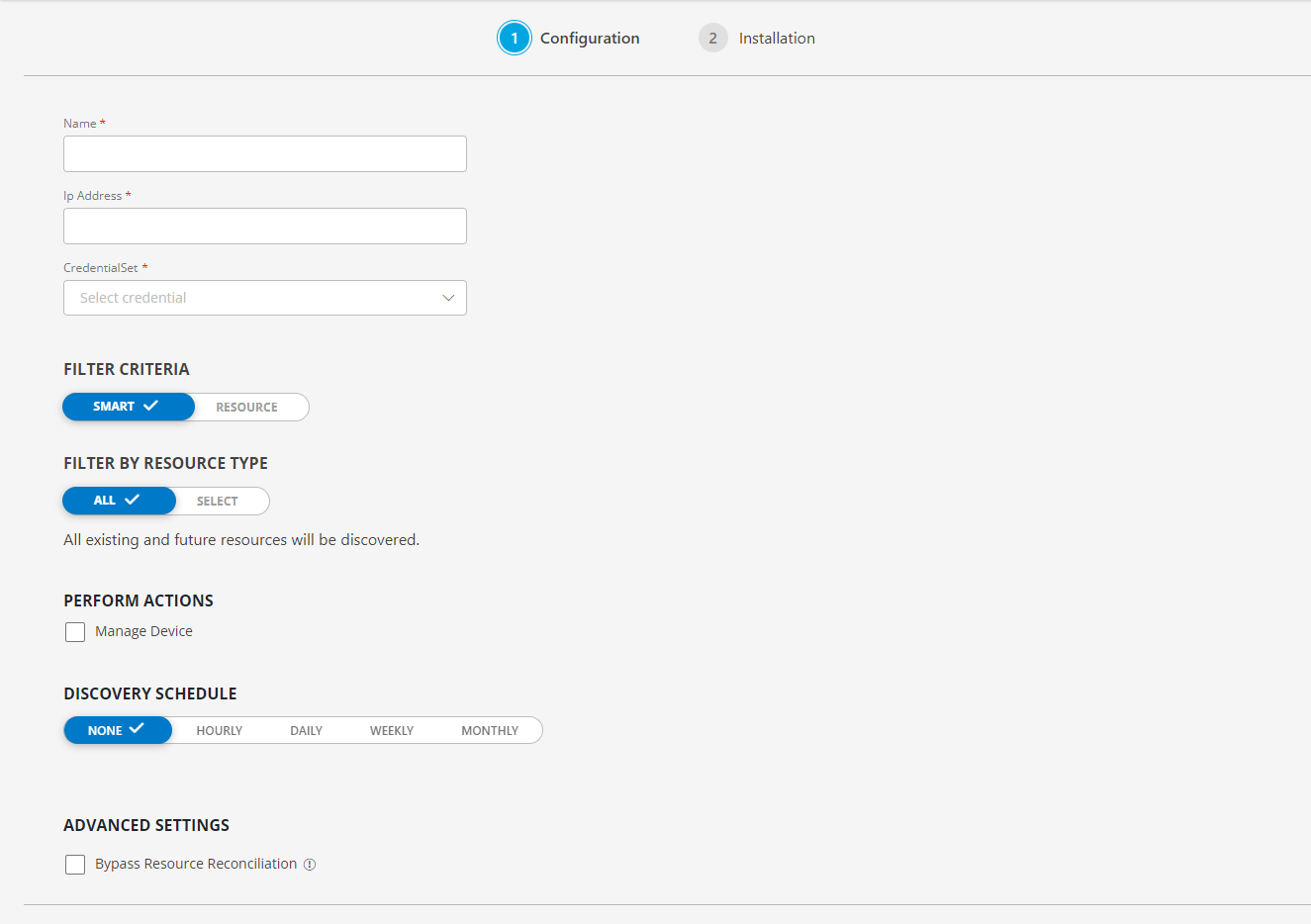
- In the Configuration page, enter the below information:
| Functionality | Description |
|---|---|
| Name | Enter the name for the configuration. |
| Ip Address | Enter the IP address. |
| CredentialSet | Select the CredentialSet from the drop-down list. Note: Click + Add to create a credential. |
From the FILTER CRITERIA section, select:
- SMART: Use to filter resources based on the resource type.
- RESOURCE: Use to filter resources based on certain resource attributes.
In the FILTER BY RESOURCE TYPE section, select:
- ALL: All the existing and future resources will be discovered.
- SELECT: You can select one or multiple resources to be discovered.
- Enter the Key, Operator, and Value information.
From the Perform Actions section, choose Manage Device to set the resources as managed.
In the DISCOVERY SCHEDULE section, select recurrence pattern to add one of the following patterns:
- Minutes
- Hourly
- Daily
- Weekly
- Monthly
(Optional) Under the ADVANCED SETTINGS, Select the Bypass Resource Reconciliation option, if you wish to bypass resource reconciliation when encountering the same resources discovered by multiple applications.
Note: If two different applications provide identical discovery attributes, two separate resources will be generated with those respective attributes from the individual discoveries.
Click NEXT.
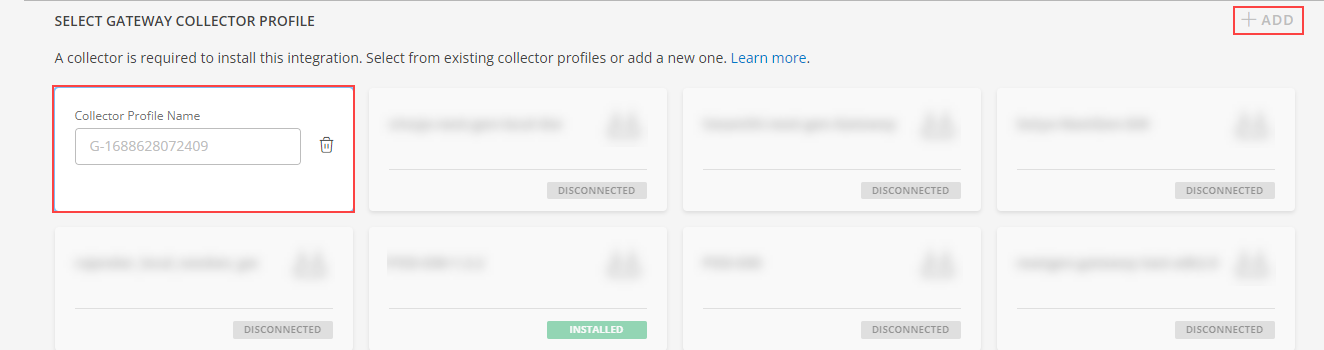
- (Optional) Click +ADD to create a new collector by providing a name or use the pre-populated name.
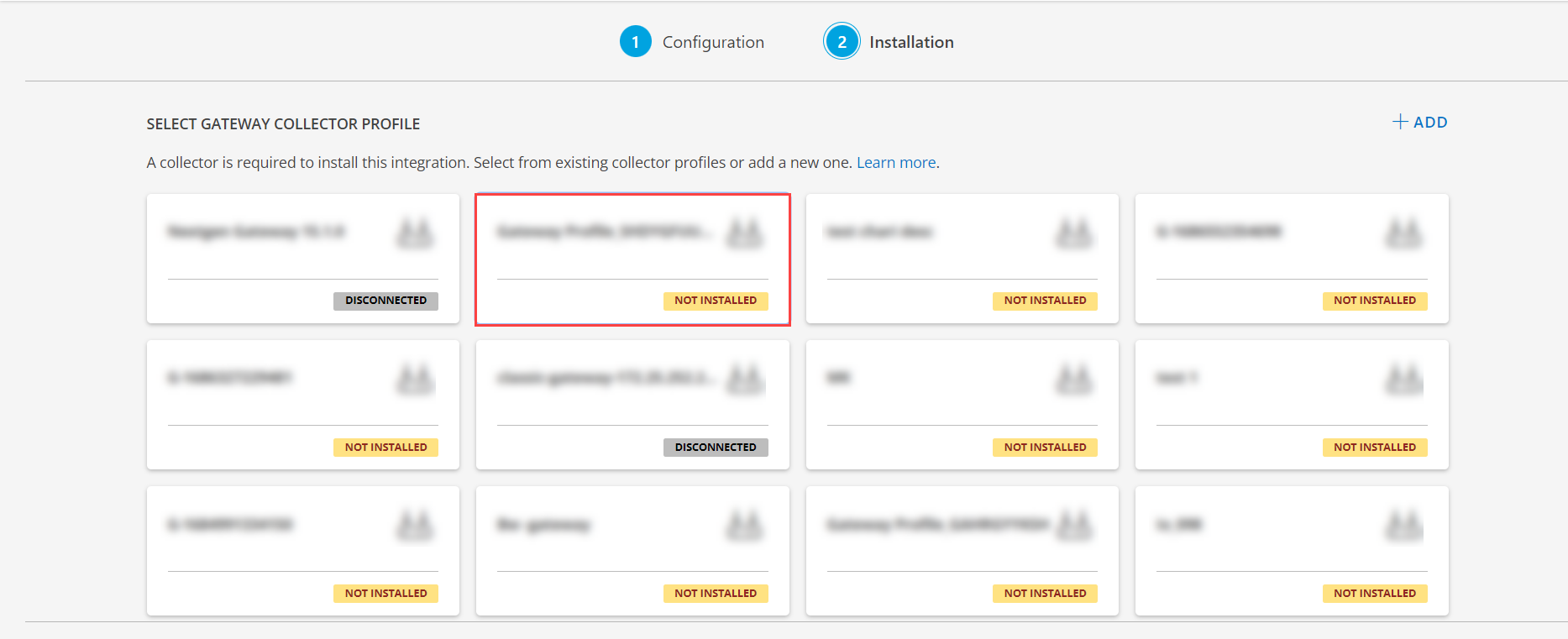
- Select an existing registered profile, and click FINISH.
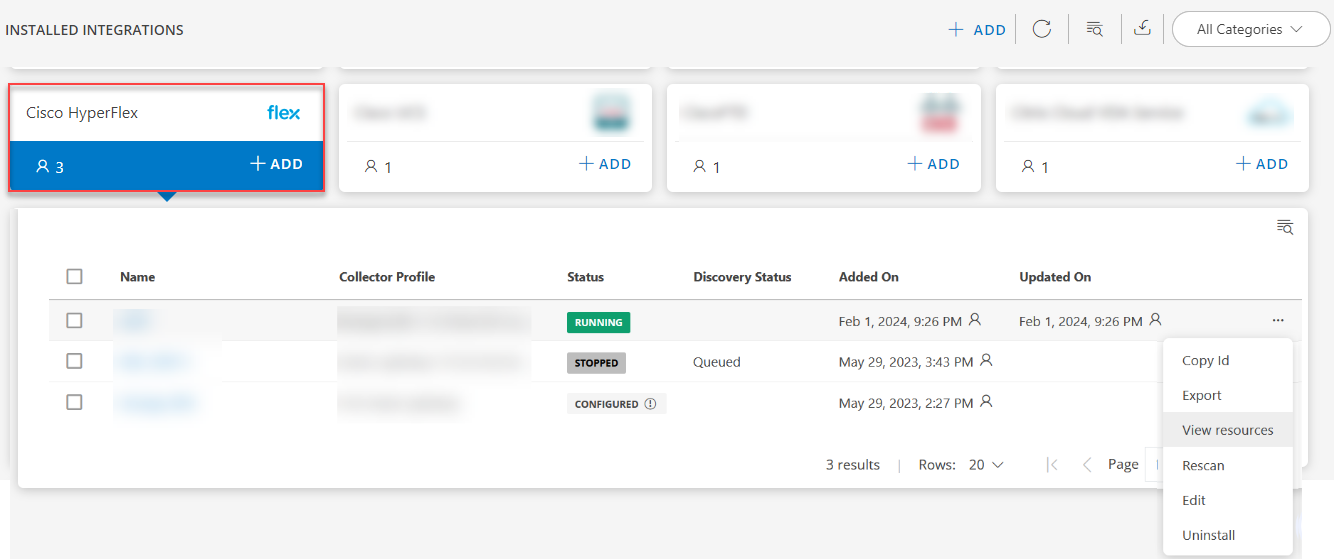
The application is now installed and displayed on the INSTALLED INTEGRATIONS page. Use the search field to find the installed application.
- (Optional), Select the Cisco HyperFlex Integration.
- (Optional), Click the ellipses and choose the View resources option.
Supported templates
The gateway is the collector type for the following supported HyperFlex metrics:
| Name | Description |
|---|---|
| HyperflexAlarmTemplate | Monitors HyperflexAlarmMonitor metrics |
| HyperflexClusterEventsTemplate | Monitors HyperflexClusterEventsMonitor metrics |
| HyperflexClusterPerformanceTemplate | Monitors HyperflexClusterPerformanceMonitor metrics |
| HyperflexClusterTemplate | Monitors HyperflexClusterMonitor metrics |
| HyperflexControllerVmTemplate | Monitors HyperflexControllerVMMonitor metrics |
| HyperflexDatastoreTemplate | Monitors HyperflexDatastoreMonitor metrics |
| HyperflexHostPerformanceTemplate | Monitors HyperflexHostPerformanceMonitor metrics |
| HyperflexNodeDiskTemplate | Monitors HyperflexNodeDiskMonitor metrics |
| HyperflexHostTemplate | Monitors hyperflex host status info. Validated against hyperflex version 4.0.2d-35606 |
| HyperflexVirtualMachineTemplate | Monitors HyperflexVirtualMachineMonitor metrics |
Event processing
Event data is collected from the configured Hyperflex cluster and posted directly to alerts. The following templates do data collection and post alerts:
- CI-HyperflexAlarmTemplate
- CI-HyperflexClusterEventsTemplate
These templates do not have metric graphs or the latest snapshot data.
View the Cisco HyperFlex details
Assign monitoring templates to the resource
- Go to Infrastructure > Resources.
- From the Cisco HyperFlex resources page, click the resource name and go to the resource details.
- Go to Monitors > Template.
- From the Templates screen, click +Assign Templates.
- From the Apply Templates screen, go to Select Templates > Available templates and select the templates.
- Click Assign.
Validation the resource is successfully added
The gateway monitors the application using the assigned templates and displays the results in a graphical format.
To confirm that the device is being monitored, review the following:
- The graph plotted for each metric in the template.
- Alerts generated for metrics in the template by giving thresholds.